

Imagine if data pipelines could detect new data as soon as it arrived, rather than checking for it on a fixed schedule. Or if one data platform could easily inform another, “Hey, that run finished, here’s how it went,” so the next system could get to work without constantly checking in.
And while we’re at it: wouldn’t free GPUs be great? Zero network latency? An inbox with no spam?
Some things are just wishful thinking. But for teams managing real data platforms, having reliable events between systems shouldn’t be out of reach.
Before now, connecting Tower to your data stack meant polling the Tower status APIs. This method worked, but it wasn’t real time.
That changes today.
We’re excited to introduce Tower webhooks, a straightforward, standardized way to get real-time updates from your Tower runs and connect them to your existing systems.
With webhooks, Tower can notify your applications as soon as a run starts or finishes, whether it succeeds or fails, so other tools can respond right away.
Why webhooks matter
Modern data systems are rarely isolated. Even the best-designed setups often use several platforms, like data ingestion tools, transformation pipelines, analytics engines, orchestration layers, alerting systems, and more agent-based services that act on new data.
The challenge isn’t just running pipelines. It’s making sure everything that follows is coordinated.
Traditionally, there are two ways to connect the control planes of multiple platforms:
-
Event queues like Kafka or cloud-managed equivalents
-
HTTP-based webhooks
Event queues are useful, but they require real effort to manage. You have to set up infrastructure and have someone ready if the event cluster has issues. For many teams, that’s a lot to handle just to find out if a run succeeded or failed.
Webhooks work differently. Instead of sending events to a shared queue, Tower sends a structured HTTP request straight to an endpoint you manage. There are no brokers, no consumers, and no extra infrastructure to maintain.
We chose webhooks as Tower’s first eventing method because of their simplicity.
What Tower webhooks do
In short, Tower webhooks let you subscribe to events inside Tower and get them in real time over HTTP.
Each webhook event is sent as a POST request with a JSON payload to a URL you define. Events include lifecycle changes such as:
-
A run starting
-
A run finishing successfully
-
A run failing
This gives external systems instant insight into what’s happening in Tower, without polling or waiting for scheduled checks.
Since the event is sent directly to you, your systems can respond right away:
-
Trigger downstream pipelines
-
Update dashboards
-
Send alerts
-
Kick off incident workflows
-
Feed status into another data platform or orchestration layer
Typical use cases
Teams are already using webhooks in a few common patterns:
Cross-platform orchestration
If Tower handles one part of your data stack, webhooks let you alert another platform when a run finishes. For example, a transformation run in Tower can tell a serving layer or analytics system that new data is ready.
Monitoring and alerting
Instead of checking logs or polling run status APIs, you can send run failure events straight to your alerting or incident management system. When something goes wrong, you know right away and with context.
Custom automation
Some teams use webhooks as the glue for internal tools: updating internal dashboards, tracking SLAs, or feeding metadata into catalogs or observability systems.
Agent-based systems
If you’re trying out data agents, webhooks give a clear signal when something changes. An agent can listen for run completion events and decide what to do next, without having to keep checking for updates.
How to get started with Tower webhooks
We’ve made getting started with webhooks as simple as possible.
Create an endpoint
First, set up a publicly accessible HTTP endpoint on your side. This endpoint should:
-
Accept POST requests
-
Accept JSON
-
Return a 200 status code on success
Tower includes two headers with every webhook request:
-
X-Tower-Signature
-
X-Tower-Webhook-Timestamp
These headers help you confirm that the request really came from Tower.
Configure the webhook in Tower
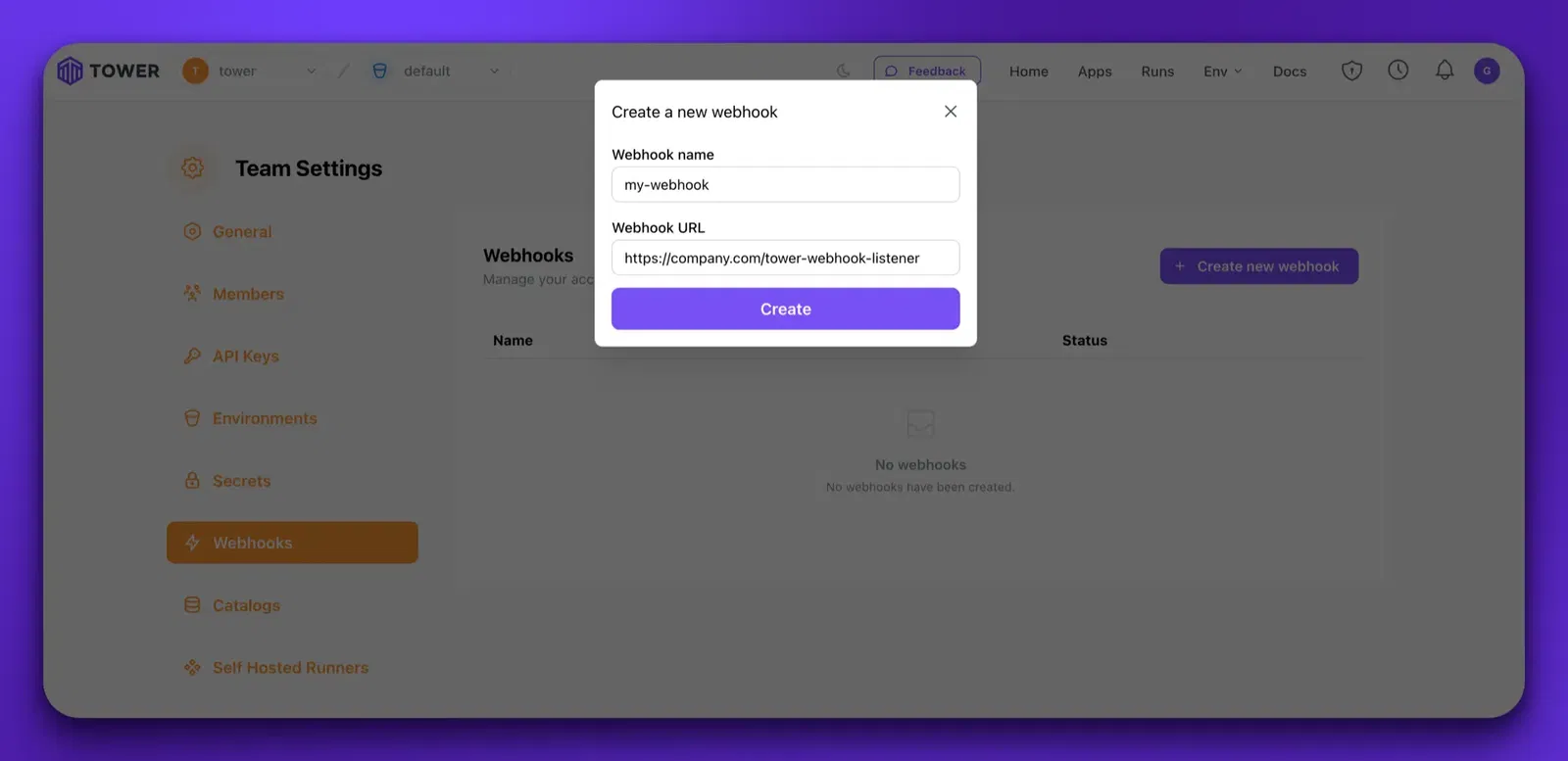
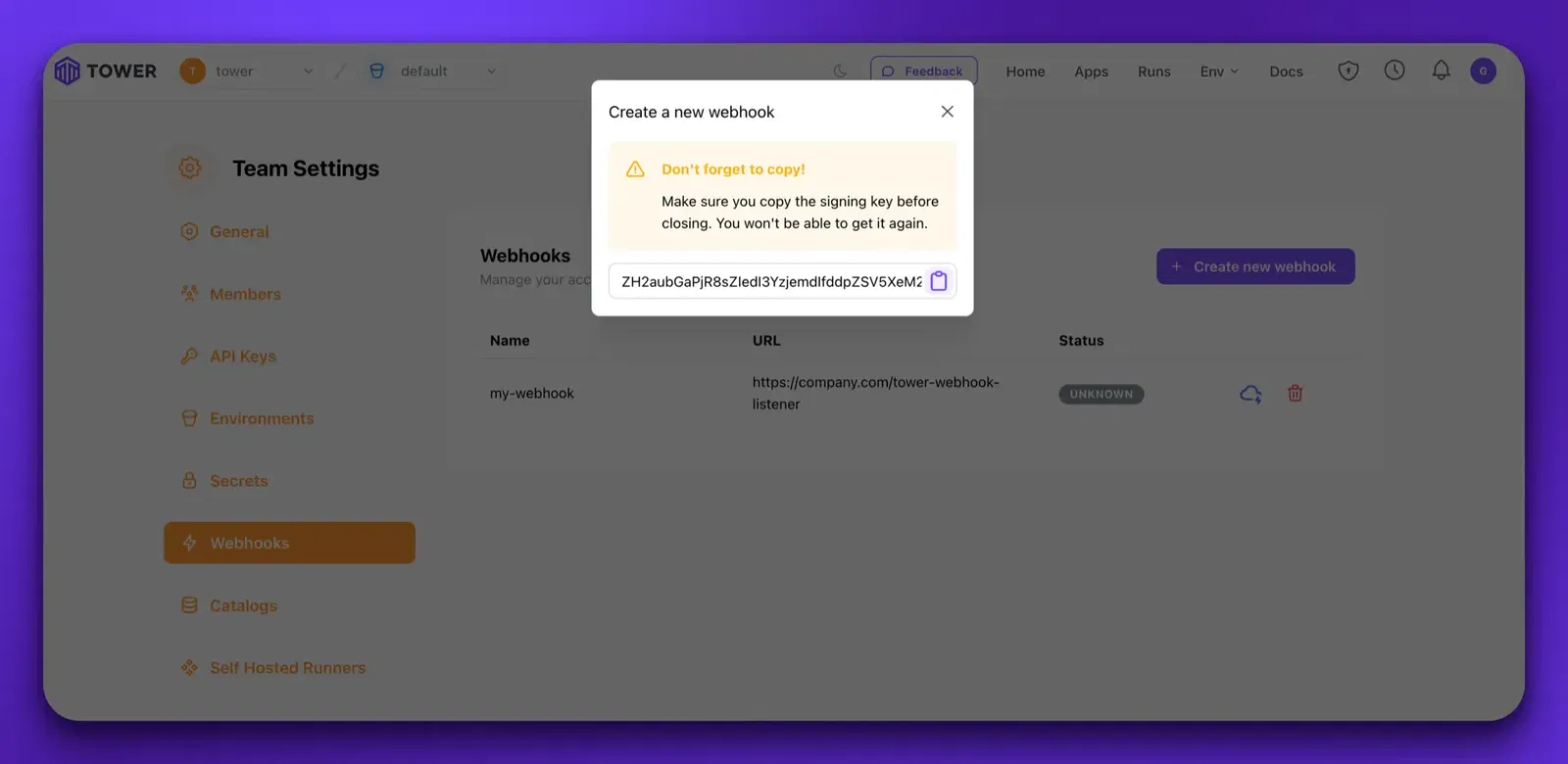
In Tower’s Team Settings, create a webhook configuration and point it to your endpoint. During setup, Tower creates a shared secret. This secret is shown only once, so be sure to save it somewhere safe.
That’s all there is to it!
To learn more, see our webhooks documentation for tips and tricks on using webhooks.
Event-driven, without the overhead
Webhooks won’t make GPUs free or stop email spam. But they do solve a common problem: getting reliable, real-time signals from your data platform without adding more infrastructure.
With Tower webhooks, your pipelines don’t just run; they communicate.
That small feature can help unlock much larger systems.